Multitrack online audio editor: tracks, playhead, zoom | Patefon Studio

Multitrack editor in the browser

After splitting a song into stems, you mix parts in one workspace: per-track levels, a BPM grid, waveforms, and mix export — no desktop software required.

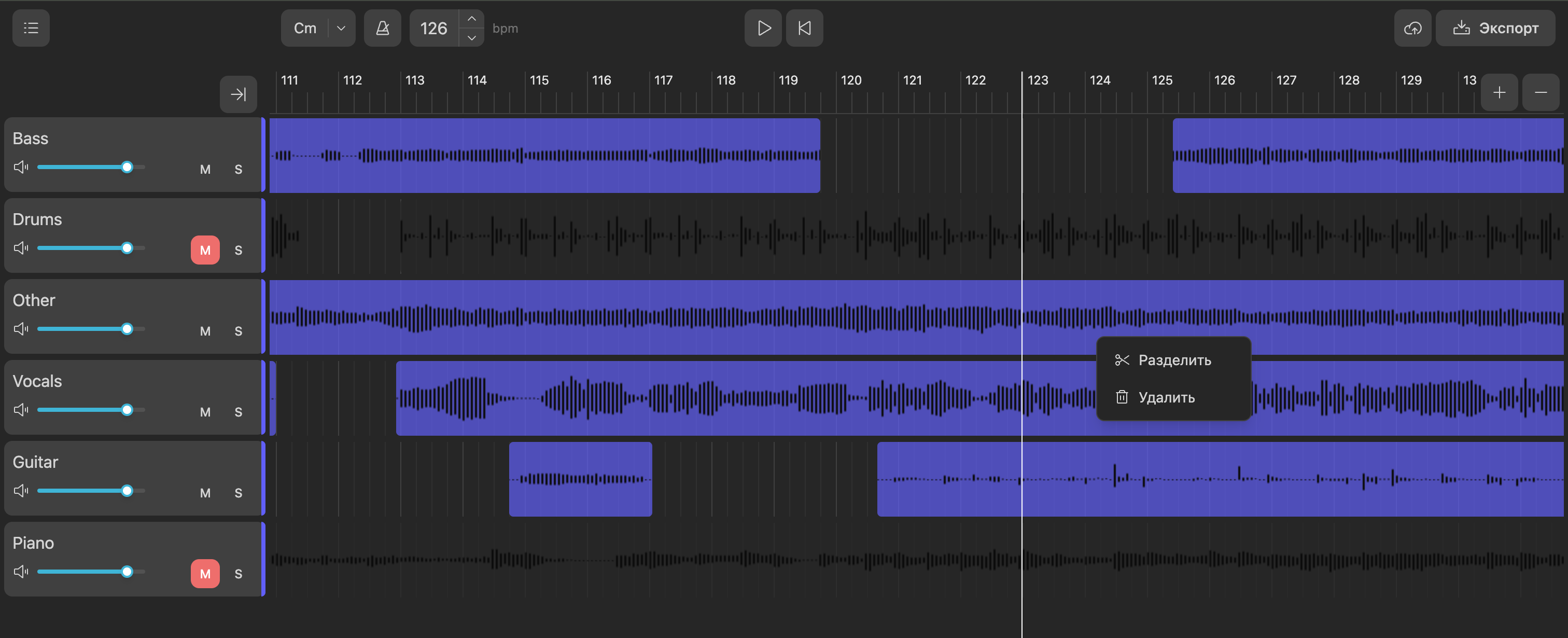
Screenshot of the Patefon Studio multitrack editor showing waveforms on several tracks and the timeline
Try for free

Sign up, upload a track, and open it in the track editor.

What the editor offers

Volume, mute, and solo on every track

Each track has a volume slider plus M (mute) and S (solo). When any track is soloed, only soloed tracks are heard and the rest are treated as muted for monitoring — the usual DAW-style workflow for checking vocals, bass, or drums before export.

Playhead follow

Turn on follow mode from the control panel: during playback the timeline scroll area smoothly tracks the playhead position. If you scroll the timeline yourself with the wheel or a touch gesture, follow turns off so manual navigation stays in control.

Track and timeline zoom

The + and − controls change horizontal scale: each grid cell covers more or less time and waveforms redraw for the new zoom level. With Ctrl or Cmd held, the mouse wheel zooms around the point under the cursor so you do not lose your edit context.

Samples: context menu and timeline editing

Right-click a sample block for Split and Delete. Split cuts at the current playhead position inside that clip. You can also drag samples along the track and trim from the left or right edge; boundaries stay aligned with the BPM grid.

FAQ

Try for free

Sign up, upload a track, and open it in the track editor.